





Asana Test Management Software for QA Teams
Asana is great for keeping projects and tasks on track. But it was never meant to handle software QA specifically. That’s the gap Kualitee fills. When you connect the two, your issues and requirements sync automatically. Your team can keep working in Asana while all the testing happens in Kualitee.
You get proper test management without the hassle of logging the same bug in two places.
Connect Asana Project Management with Test Management
Asana and Kualitee do two different jobs. And they do them well.
Asana keeps your projects moving. It’s where your team:
- ✓ Plans and organizes tasks
- ✓ Assigns work across the team
- ✓ Stays aligned on what’s happening day-to-day
Kualitee is built for the testing side. It’s where you:
- ✓ Store and manage your test cases
- ✓ Run test executions and log the results
- ✓ Track defects from the first report through to fix
The integration connects those two worlds. Once Asana and Kualitee are linked, your issues and requirements sync between them. So, nobody has to jump between tabs to assign work or check on it.
Here’s how that plays out:
- ✓ Start a requirement in Asana and it shows up in Kualitee.
- ✓ Log a defect in Kualitee and your project team sees it in Asana.
Additionally, because you can link more than one Asana project at a time, this works whether you’re running a single product or juggling several at once.

Simplify Software Testing with Asana Integration
Connecting Asana to Kualitee takes the manual work out of keeping two tools in sync. Here’s what your team gets out of it.
Two-Way Issue and Requirement Sync
Work from whichever tool suits you. Issues and requirements sync both ways. So, a change in Asana shows up in Kualitee, and the other way round.
Keep QA & Project Teams Aligned
Testers, developers and project managers all see the issues and testing activity that matter to them. Without chasing each other for updates.
Reduce Duplicate Data Entry
No more logging the same bug or requirement twice. Enter it once and it carries across, so nothing gets missed in the copying.
Centralize Test Management
Your test cases, executions, defects and QA activity all live in Kualitee. In one place where your team can actually work from.
Connect Multiple Asana Projects
Link as many Asana projects as you need. Whether it’s one product or several running at once, each stays synced with Kualitee.
How Kualitee’s Asana Integration Works
Getting set up takes four steps. And none of them need a developer, fortunately.
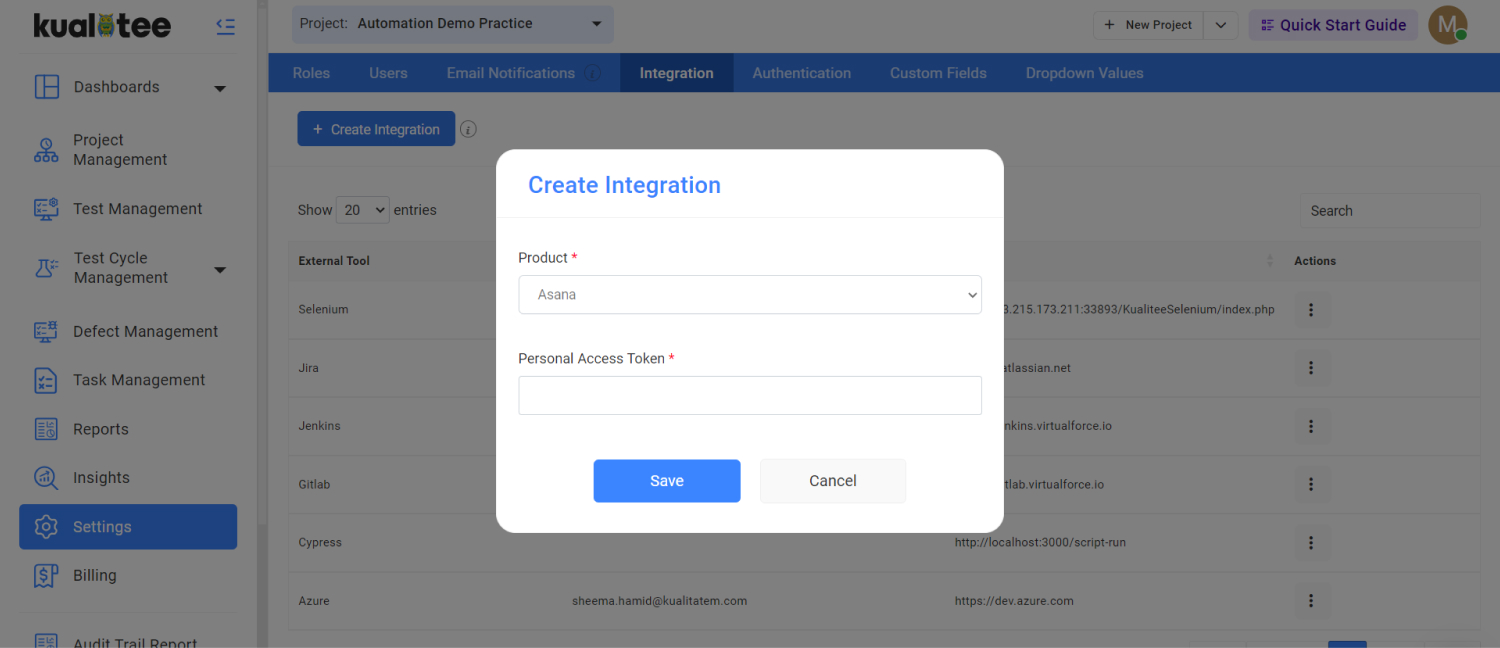
Connect Asana
In Kualitee, open your integration settings and set up the Asana connection. You’ll need admin access to both tools to do this.
Link Your Projects
Pick the Asana project you want to connect and link it to the matching project in Kualitee.
Sync Issues and Requirements
Once linked, your issues and requirements start syncing between the two. Asana’s tags decide whether an item lands in Kualitee as a requirement or a defect.
Manage Testing in Kualitee
From here, run your test cases, log defects and track QA progress in Kualitee. Your project information stays in sync with Asana the whole time.
Asana Tasks Alone vs Asana with Kualitee
| Task | Asana on its own | Asana + Kualitee |
|---|---|---|
| Project and task management | Built for it, works well | Stays in Asana, nothing changes |
| Test case records | No concept of a test case | Full test case repository, manual and automated |
| Test execution history | Not tracked | Pass and fail history across every run |
| Issue and requirement sync | Lives only in Asana | Syncs both ways between Asana and Kualitee |
| Requirement vs defect sorting | Manual, by hand | Asana tags file each item automatically in Kualitee |
| Requirement traceability | None | Requirement to test to defect, linked |
| Multi-project QA | Tasks scattered per project | Every linked project stays synced to its testing |
| Who can see it | Whoever has Asana access | Role-based access for QA, dev, project and product teams |
Key Features of Asana Test Management Software
These are the features that make the Asana connection work. Both tools tell the same story because of them.
Two-Way Synchronization
Create or update an issue or requirement in either tool. The change carries across to the other. So, Asana and Kualitee never fall out of step.
Pre-Configured Field Mapping
The integration maps the right Asana and Kualitee fields to each other out of the box. So, your information stays consistent without any manual setup for each item.
Issue & Requirement Management
The details that matter sync across too. Including task names, defect descriptions, steps to reproduce and status. Your team gets the full picture on either side.
Requirement & Defect Classification
Asana’s tag system decides whether an item is a requirement or a defect. And Kualitee fits it in the right listing automatically. No sorting by hand.
Multi-Project Support
Connect as many Asana projects as you need. So, every project your team runs stays linked to its testing in Kualitee.
Bring Asana Projects and QA Testing Together
You don’t have to give up Asana to get serious about testing. That’s the whole point of the integration. Your project team keeps working the way they already do. While your QA team gets a proper home for everything testing-related. That home is Kualitee. It’s where your team can:
- ✓ Build and run test cases
- ✓ Track defects from report to fix
- ✓ Manage requirements alongside the tests that cover them
- ✓ Organize testing across all your projects
- ✓ Keep an eye on QA progress and results
- ✓ Trace any requirement through to its tests and the defects they turned up
Kualitee pulls all of that into one place. So, testing stops living in scattered tasks and spreadsheets. And because it stays synced with Asana, your project and QA teams are never working off different information.
One side plans, the other tests, and both always know where things stand.

Frequently Asked Questions
It's a test management platform that connects to Asana so your testing and your project work stay in sync. Asana handles the projects and tasks. Kualitee handles the test cases, executions, defects, and requirements, and the integration keeps issues and requirements aligned between the two.
Yes. Kualitee has a two-way integration with Asana. Once it's set up, you can link your Asana projects to Kualitee and work from either tool without copying information across by hand.
Yes, and it works both ways. An issue or requirement you create or update in Asana shows up in Kualitee, and anything logged in Kualitee syncs back to Asana. Asana's tags decide whether an item lands as a requirement or a defect.
You can. Link as many Asana projects as you need, so every project your team runs stays connected to its testing in Kualitee.
The integration syncs the details your team relies on, including task names, defect descriptions, steps to reproduce and status. That way, both tools carry the same information without anyone re-entering it.
Set it up from your integration settings in Kualitee. You'll need admin access to both tools, and the integration uses predefined field-to-field mapping, so once it's connected, the right fields line up on their own.
Ready to Add Real Test Management to Asana?
Keep running your projects in Asana. Just let Kualitee handle the testing side. Once the two are connected, your issues and requirements stay in sync. Your QA work lives in one place and nobody loses time copying the same thing twice.
Start a free trial and connect your first Asana project, or book a demo and we'll walk you through it.