





Slack Test Management Software for QA Teams
Your team already lives in Slack. So why make them open Kualitee just to find out that a defect was logged or a status changed?
Connect the two. And Kualitee posts your testing updates straight into the Slack channels your team already watches.
QA, developers and project folks stay in the loop as testing moves, without anyone switching tabs to check.
Connect Kualitee Test Management with Slack
Slack and Kualitee solve two different problems. But together, they cover a gap that most QA teams know well.
Slack is where your team talks. It’s where your:
- ✓ Developers, testers and project leads stay in touch
- ✓ Team shares updates and decisions throughout the day
- ✓ Quick questions get asked and answered fast
Kualitee is where the testing happens. It’s where you:
- ✓ Manage and run your test cases
- ✓ Track defects from first report to fix
- ✓ Keep your whole QA process organized in one place
The trouble is that testing updates usually stay locked inside the test tool. Someone logs a defect in Kualitee, and unless a teammate opens Kualitee to look, they never see it. This integration closes that gap. Kualitee sends your issue and defect updates straight into the Slack channels. Ones that your team already watches.
Here’s how that plays out:
- ✓ Log a defect in Kualitee, and the update lands in your Slack channel
- ✓ The right people see it without opening the test tool
- ✓ Your QA work stays in Kualitee. While Slack handles the talking

Simplify Software Testing with Slack Integration
Sending Kualitee updates into Slack takes the chasing out of keeping everyone informed. Here’s what your team gets.
Real-Time Issue Updates
When an issue is logged or updated in Kualitee, it posts to your Slack channel right away. No waiting for someone to check the tool.
Keep QA & Development Teams Aligned
Developers, testers and stakeholders see the testing issues that matter to them. Without everyone needing to work inside Kualitee.
Reduce Context Switching
Your team stays in Slack for updates instead of jumping back and forth between tools all day.
Speed Up Issue Response
When a problem shows up in the channel, the right people spot it. And act on it sooner.
Centralize Test Management in Kualitee
Keep running your test cases, executions, defects and requirements in Kualitee. Slack just handles the updates.
Customizable Field Mapping
Set up field mapping so the Kualitee details that matter show up the way you want them in Slack.
How Kualitee’s Slack Integration Works
Setup takes 4 steps and you won’t need a developer for any of them.
Connect Slack
In Kualitee, head to your integration settings to start setting up the Slack connection.
Enter Your Slack Details
Choose Slack as the tool you’re connecting and add the Slack account details it asks for.
Configure Field Mapping
Set up the field mapping so the right Kualitee information shows up. Just the way you want it in Slack.
Send Issues to Slack
Save the setup. And Kualitee starts posting your issue and defect updates to the Slack channel of your choice.

Key Features of Kualitee Slack Test Management Software
These are the features that make the Slack connection work.
One-Way Issue Sync
Kualitee sends issue and defect updates to your Slack channels automatically. The flow goes one direction. From Kualitee into Slack.
Automatic Issue Updates
When something changes on a Kualitee issue, the update posts to Slack on its own. Nobody has to write the message.
Customizable Field Mapping
Decide which Kualitee fields show up in Slack and how. So, the posts carry the details your team cares about.
Slack Channel Notifications
Updates land in the channels where your developers, testers and stakeholders already work. Not in a separate inbox.
Admin-Level Configuration
The setup is handled by someone with admin access on both Kualitee and Slack. So, it’s controlled and secure.
Easy Setup
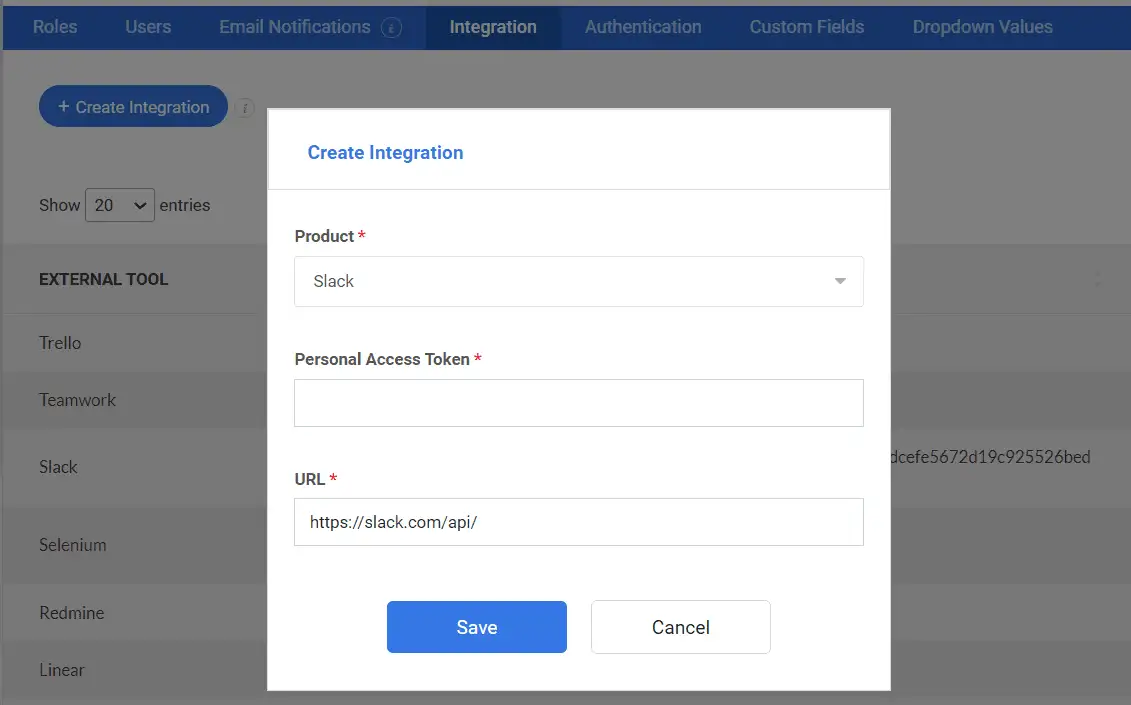
You can set the whole thing up from Kualitee’s integration settings. Go to Settings, then Integration, choose Create new, pick Slack, add your Slack details and save.
What Kualitee Sends to Your Slack Channel
Here’s what shows up in Slack, and when.
| What Happens in Kualitee | What Lands in Slack | Who It Helps |
|---|---|---|
| A new defect is logged | A message with the defect details in your chosen channel | Developers see the bug without opening Kualitee |
| An issue status changes | An update showing the new status | Testers and leads track progress in real time |
| Issue details get updated | A note with the changed information | The team stays on the same version of the story |
| A defect is assigned | An update showing the assignment | The right person knows it’s on them |
| Field mapping decides the content | Only the fields you chose to include | Channels stay clean and relevant |
Frequently Asked Questions
It’s a test management platform that connects to Slack. This way, your testing updates reach your team where they already talk. Kualitee handles the test cases, executions and defects. The integration posts issue updates into your Slack channels automatically.
Yes. Kualitee connects to Slack at the project level. Once it’s set up, your Kualitee issue and defect updates get sent to the Slack channel you choose. This way, your team stays informed without opening the test tool.
Kualitee sends issue and defect updates. These include new defects, status changes and updates to existing issues. Field mapping lets you control which details show up. So, the posts carry what your team needs and nothing extra.
No. It’s one-way. From Kualitee to Slack. Updates flow out of Kualitee and into your Slack channels. Slack doesn’t send anything back into Kualitee. Your test data stays managed in one place.
Yes. Setting up the integration needs admin access on both Kualitee and Slack. Once it’s configured, your team just sees the updates come through in the channel.
Go to Settings, then Integration in Kualitee. Choose Create new, pick Slack, enter your Slack account details and save. After that, Kualitee starts sending issue updates to your chosen channel.
Ready to Bring Testing Updates into Slack?
Keep your team working in Slack. Let Kualitee handle the testing and send the updates that matter straight into your channels. Your QA activity shows up where everyone already is. So, nobody has to go digging for it.
Start a free trial and connect your first Slack channel. Or book a demo and we’ll show you how it works.